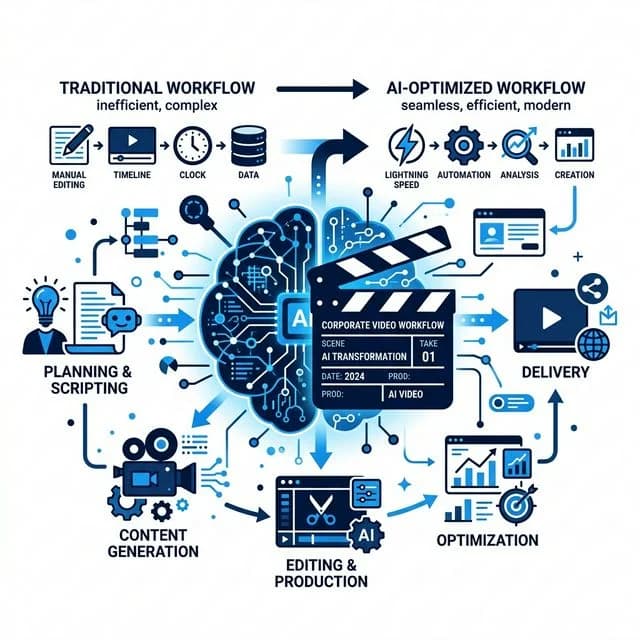
AI video editing tools for business — what actually works in 2026?

The AI video tools ecosystem moves at breakneck speed. Every single week brings another product release touting "full video automation in a single click". For corporate marketing departments, wading through the noise is frustrating: half of these applications are superficial wrappers producing uncanny, robotic clips that damage credibility in serious B2B markets.
Yet beneath the hype cycle, a suite of mature machine learning tools has genuinely transformed professional post-production. They shave dozens of hours off repetitive mechanics, lower turnaround times, and allow companies to release more polished video assets within the same creative budget.
Here is an objective, practical breakdown of AI video editing tools for business in 2026: what delivers real ROI, and what to avoid.
💡 Key Takeaways (TL;DR)
- AI video tools excel at mechanical automation: rapid transcriptions, pause cuts, speech isolation, and intelligent 9:16 aspect reframing.
- Synthetic avatars and robotic voiceovers erode B2B trust — corporate audiences immediately spot and reject fake presenter visuals.
- The winning strategy is a hybrid workflow: cinematic footage captured on real sets paired with an accelerated AI post-production pipeline.
1. Text-based video editing
A monumental breakthrough for talking-head content (interviews, executive keynotes, client case studies, educational videos). Instead of scrubbing a playhead back and forth across raw footage, the editor works directly on a generated transcript.
- How it works: The engine generates a word-for-word transcript timestamped down to milliseconds. Deleting a sentence, a filler word ("um", "ah"), or an awkward pause in the text window automatically ripples the video timeline beneath it.
- Industry standards: Descript, Adobe Premiere Pro (native Text-Based Editing engine).
- Business benefit: Cuts rough-cut editing turnaround by up to 60%.
2. AI speech isolation and audio restoration
Audio accounts for well over 50% of the perceived quality of any film. Viewers tolerate imperfect camera angles; echoing audio in an untreated boardroom causes instant drop-off.
- How it works: Neural audio models analyse speech patterns, isolating the speaker’s vocal frequencies while stripping HVAC hum, street traffic, and empty office flutter echo, outputting sound comparable to a soundproof recording booth.
- Industry standards: Adobe Podcast AI (Enhance Speech), iZotope RX Dialogue Isolate.
- Business benefit: Professional sound quality even when filming in active facilities, factories, or client premises.
3. Intelligent auto-reframe for vertical video
Vertical video dominates social attention. However, standard horizontal 16:9 recordings must be reformatted so moving speakers remain centered in the frame.
- How it works: Computer vision models track faces and bodies, keeping subjects centered within vertical 9:16 compositions without requiring an editor to keyframe motion paths by hand.
- Industry standards: Adobe Auto Reframe, DaVinci Resolve Smart Reframe.
- Business benefit: Seamless content repurposing — one long-form horizontal interview instantly generates a stream of vertical clips for Instagram Reels, TikTok, and YouTube Shorts. For best practices, see our guide to Reels, Shorts and vertical video editing.
4. Brand-aligned automated captions
Over 70% of social media feeds are browsed with the sound turned off. Without legible on-screen captions, you lose viewers within the first three seconds.
- How it works: Speech-to-text algorithms sync words in real time, highlighting active phrasing with subtle kinetic animations.
- The critical distinction: Consumer mobile apps use loud neon fonts and cartoon emojis. Enterprise tools support custom brand typefaces, corporate brand guidelines, and subtle styling fitting a serious brand.
- Industry standards: Submagic, Captions AI, custom MOGRT presets in Premiere.
5. What to steer clear of in B2B — the low-rent AI traps
In attempts to cut costs, businesses frequently adopt gimmicks that backfire:
- Synthetic AI avatars (generated talking heads): Virtual presenters with airbrushed skin and unnatural blinking trigger the "uncanny valley" effect. Business communication requires trust; clients want to see real leaders and engineers, not rendered synthetic bots.
- Monotone voice synthesizers: Text-to-speech models continue to improve, yet they consistently lack genuine passion, hesitation, and natural nuance.
- Prompt-generated b-roll illustrations: Illustrating corporate achievements with generic image-generator clips looks amateur and suggests your business has neither physical facilities nor real clients.
We dissect the staffing and strategic dilemmas around these technologies in our companion piece: AI Video Editor for business — role, costs, and hiring guide.

The verdict: The hybrid model wins
The most effective video strategy in 2026 blends:
- A genuine shoot day with cinema glass, lighting, and seasoned direction (delivering authentic, high-resolution source material).
- An AI-accelerated post-production pipeline (turning raw material rapidly into dozens of multi-channel deliverables, clean audio, and subtitles).
This approach preserves executive authority while delivering repeatable, scalable video output. See how this operates within our monthly video content for companies service.
FAQ — AI video editing tools
Frequently Asked Questions (FAQ)
Will AI editing software replace human video editors?
No. AI automates mechanical tasks (transcription, captions, silence removal), but editorial judgment, pacing, narrative tension, and emotional connection remain fundamentally human.
What is the best AI tool for turning long videos into social shorts?
Descript and OpusClip are helpful for initial quote selection, but final pacing, musical rhythm, and brand typography always require an experienced editor.
Is using AI in video post-production safe for corporate data privacy?
In professional environments you should ensure enterprise licensing (e.g. Adobe Enterprise, SOC2-compliant tools) that guarantees client footage is not used to train public models.
How much turnaround time can AI tools save in production?
For speech-heavy formats, post-production turnaround drops by 30-50%, enabling studios to produce substantially higher volumes within the same production budget.
Ready for video production that leverages AI with polish?
At Sema Studio, we combine cinema-level craftsmanship with modern post-production pipelines. Check our video production pricing or book a consultation through the Briefing Room.